A free vCard QR code is enough if your details rarely change and all you want is for people to save your number. If your number, job or offers change, or you want people to see more than a contact entry, a QR code that opens a digital business card profile works better. Just make sure you know who controls that link and what happens if you stop paying.
What a vCard QR code actually does
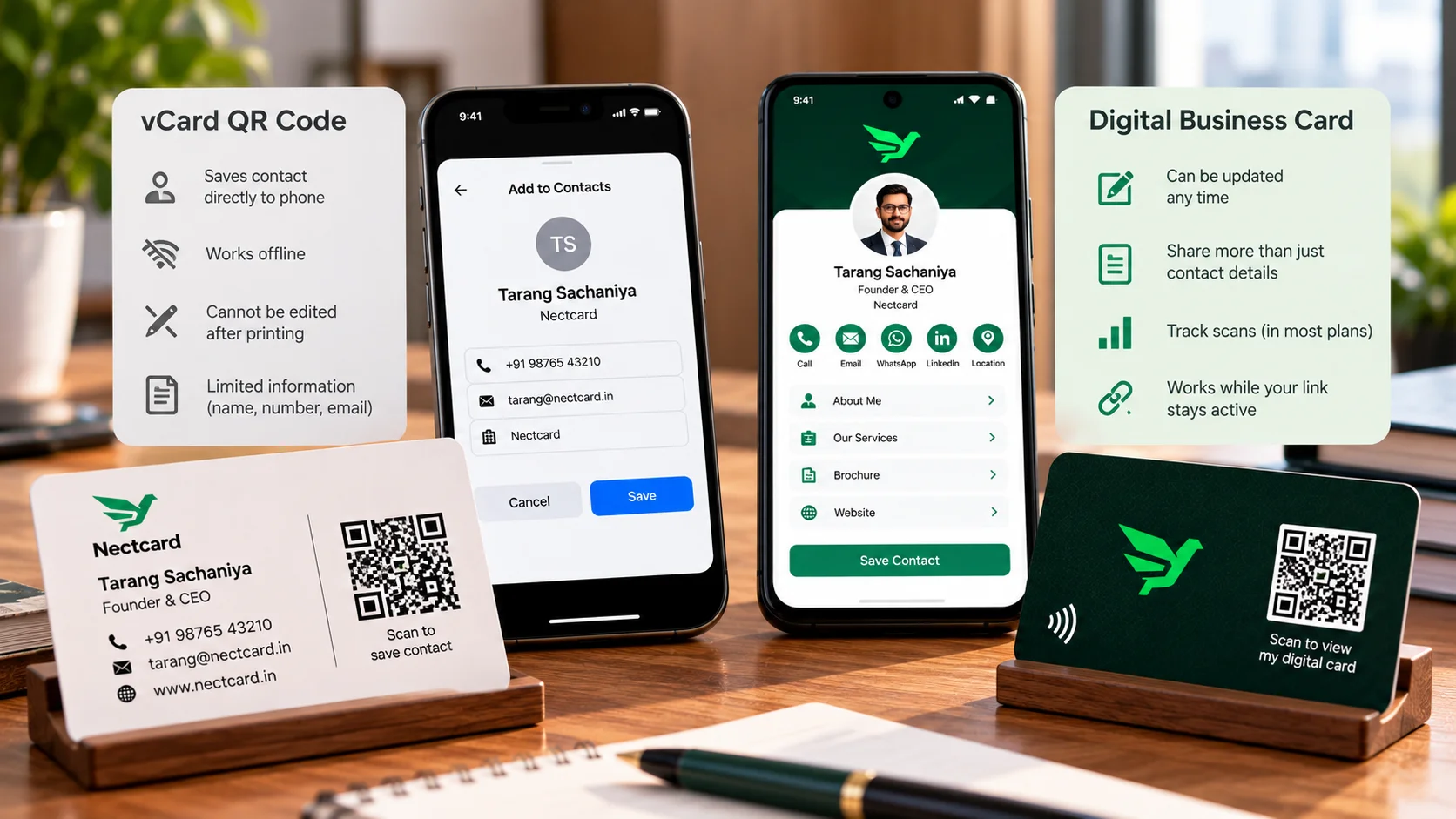
A vCard is the contact file format phones and email apps use. A static vCard QR code packs your name, number and email straight into the black-and-white pattern. Someone scans it, their phone offers to add you as a contact, and that's it. On an iPhone, the built-in Camera app reads QR codes, so no extra app is needed.
The catch is what happens after. Once the contact is saved, it's just a copy on their phone. It isn't linked to anything, so if you change your number next year, their saved copy won't update, and neither will the code you printed.
Static vs dynamic: the bit nobody explains before you print
There are two kinds of QR code, and most free generators don't make the difference obvious. A static code holds your details inside the pattern. A dynamic code holds only a short link that redirects to a page where your details live. A digital business card profile is basically a dynamic link pointing at a page you can edit.
| Static vCard QR | Dynamic QR or digital card link | |
|---|---|---|
| Where your details live | Inside the QR pattern | On a web page the code points to |
| Edit after printing? | No, you need a new code | Yes, the printed code stays the same |
| Does it expire? | Not on its own | Works only while the link or service stays active |
| Internet needed to scan? | No, the details are in the code | Yes, to open the page |
| How much it can hold | Limited; more details make the code denser and harder to scan | The code stays simple; the page can hold much more |
| Scan tracking | No | Usually yes |
Why your free QR code stopped working
You've probably seen this happen. Someone prints a box of visiting cards with a code from a free website, and a few months later it opens an error page or an upgrade screen. People ask about this regularly on design and tech forums. The usual reason: the code was dynamic, and it only worked while the generator kept the redirect running. Codes tied to a paid account can stop redirecting when the plan isn't renewed, and free plans can come with scan limits.
Static codes don't have this problem. They don't expire by themselves. They just go stale when the details inside them do.
When a plain vCard QR is enough
- Your number and email have been the same for years and will stay that way.
- You only need people to save your contact, not see your work or location.
- You don't want your card to depend on any website or subscription.
- You're printing a small batch and won't mind reprinting if something changes.
When a digital card profile makes more sense
- Your number, role or office might change, and you don't want to reprint.
- You want people to reach your WhatsApp, location, website or brochure, not just save a number.
- You'd like to change what the code shows without touching the printed card.
- You're giving cards to a team, where people join and leave.
If you go this way, pick a provider whose terms are clear. On Nectcard, for example, the card's QR code and NFC chip open a profile with a Save contact button, so the visitor still saves you in one tap, and you can edit the details any time. Plans run for 1, 2 or 3 years with no monthly fee, and you renew to keep the same link. For what to put on that profile, see what to put on a digital business card. If you're also weighing a tap chip against a code, read NFC vs QR business cards.
How to test a QR code before you print 500 cards
- Scan it with at least two different phones, ideally one iPhone and one Android.
- Check what opens: a save-contact prompt (static vCard) or a web page (dynamic link).
- Print one test card at real size and scan it from arm's length in normal room light.
- If it's dynamic, read the generator's terms on trials, cancellations and scan limits.
- Keep a copy of your contact details and the code file somewhere safe.
- Print your phone number in plain text on the card too, for anyone who won't scan.
Who this matters to most
- Doctors and clinics: clinic timings and numbers change more than you'd think. A static code on a prescription pad keeps showing the old ones, while a profile can carry current business hours.
- Real estate agents: a vCard can't show this week's listings. A profile link lets buyers see what's available after the site visit.
- Restaurants and retail: a code on a counter standee or bill should never come from a trial account. If it dies, customers just see an error at your counter.
- Freelancers and consultants: if your number never changes, a static vCard plus your website printed on the card can be perfectly fine.
- Sales teams: when someone leaves, a profile you control can be updated. Five hundred printed codes carrying their personal mobile number can't.
The short version
Static vCard codes are simple and never switch off, but they can't change. Dynamic links and digital card profiles can change, but only as long as the service behind them is running. Choose based on how often your details change, and always know who holds the switch.
Want a QR code you can edit later?
Every Nectcard card carries a QR code backup and an NFC chip that open your editable profile.