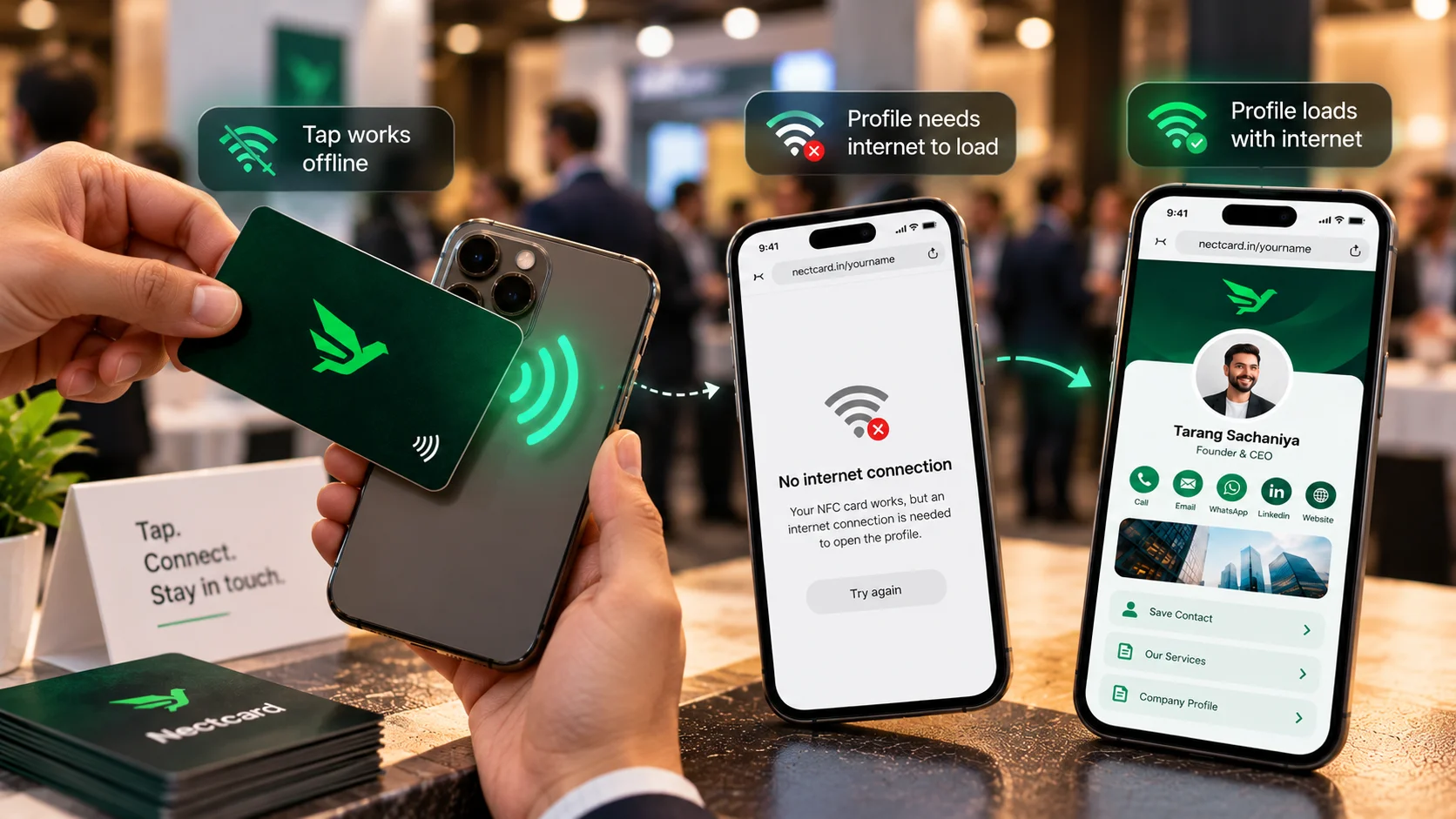
No, the tap itself doesn't need internet. NFC is a short-range radio link between the card and the phone, so the phone can read the chip with mobile data and Wi-Fi switched off. What usually does need internet is the next step: most NFC business cards store a link to an online profile, and the other person's phone needs a connection to open that page.
So the honest answer is "the card works offline, the profile mostly doesn't". Once you understand that split, planning for a no-signal basement or a crowded expo hall gets easy.
What actually happens when someone taps your card
Your card has no battery. Its tiny chip wakes up using power from the phone's NFC field, which only works at a few centimetres. The phone reads what's stored on the chip, and on most business cards that's a web link. The phone then shows a pop-up, the person taps it, and your profile opens in their browser. You can read the full walkthrough in how NFC business cards work.
Look at that chain again. Steps one and two (power and reading the chip) happen between two objects a few centimetres apart. No tower, no Wi-Fi. Step three, loading a web page, is ordinary browsing, and browsing needs data.
Who needs internet: you or the other person?
This trips people up. Your card doesn't need anything. It's a passive piece of plastic, wood or metal. The person who needs a connection is the one whose phone is opening your profile.
| Step | Needs internet? | Why |
|---|---|---|
| Tapping the card on a phone | No | NFC reads the chip directly over a few centimetres |
| Scanning the printed QR code | No | The camera reads the code without a connection |
| Opening your online profile page | Yes, on their phone | It's a web page that has to load |
| Tapping "Save contact" on the profile | Usually yes | The contact details come from the online page |
| Opening your website, Instagram or Google Maps links | Yes | Those are online services |
| Editing your profile from your dashboard | Yes, on your phone | Changes are saved online |
One small wrinkle: the QR scan works offline, but if the QR points to the same online profile (most do, so check yours), the page still won't load until their phone gets data. The scan and the tap are offline. The page isn't.
Are there cards that work fully offline?
Some services offer offline options on top of the normal card. V1CE's help centre, for example, mentions saving your page to Apple or Google Wallet and an offline QR code that holds basic contact details inside the code itself, so the person can add you without loading a page. Tapni's guide lists similar routes, including sharing a contact file (vCard) by NFC, Bluetooth or AirDrop.
The trade-off is space and flexibility. A contact file stored right on the chip or inside a QR code can only hold the basics, and it can't change after printing unless the chip is rewritten. A link to an online profile can carry your photo, WhatsApp, services, brochure and payment details, and you can edit it any time. That's why most NFC business cards, including Nectcard, use a link.
Where weak signal actually bites in India
You'll rarely notice any of this in an office or a café. It shows up in specific places:
- Basement halls and underground parking at hotels and convention centres
- Large expo halls where a crowd of phones shares the same network
- Under-construction sites and plots on the city's edge
- Older buildings with thick walls, and some lifts and stairwells
- Visitors from abroad who haven't set up a local SIM or roaming yet
In all these places your card still taps fine. The other person just sees a page that's slow to load, or a "no internet" error.
How to share your card when there's no signal
- Test before the event. Put a spare phone in Airplane mode with Wi-Fi off, tap your card, then turn data back on. You'll see exactly what your contacts will see.
- Ask if they're on Wi-Fi. Many hotels, expos and offices have guest Wi-Fi. If they're connected, the profile loads normally.
- Let them save the link for later. Wave's help docs say the link from a tap or scan opens once the phone reconnects. Behaviour differs between phones, so don't rely on it alone.
- Swap numbers the old way as a backup. Ask them to type your number into WhatsApp, or give them a missed call. Once you're both online, send your profile link in that chat.
- Keep a few paper cards in your bag for long days in poor-signal venues. There's no shame in carrying both.
Common mistakes
- Assuming a failed load means the card is broken. If the tap triggers a pop-up, the chip is fine. It's the connection.
- Testing only on Wi-Fi at home and never on mobile data in a crowded venue
- Re-tapping the card again and again when the page is slow. One tap is enough; wait for data.
- Forgetting that your QR code may point to the same online page, so it isn't a full offline backup
How this works in different industries
- Real estate: site visits often happen at under-construction towers or plots outside the city. Before you go, share your profile on WhatsApp with booked visitors so they already have it, and use the tap on site as a reminder rather than the only handover.
- Sales teams: at expos the venue Wi-Fi is often busy. Ask your organiser for the exhibitor Wi-Fi details and keep the network name handy at the stall so visitors can connect before they tap.
- Restaurants and retail: if your card sits on the billing counter, put a small note with your guest Wi-Fi name next to it. People who join the Wi-Fi can open your page even if their own data is weak indoors.
- Freelancers and consultants: meetups in co-working basements are common. Make the follow-up message your real handover, and treat the tap as the quick intro.
Where Nectcard fits
A Nectcard has no battery and opens in the visitor's browser with no app needed, so it behaves exactly as described above: the tap works anywhere, the profile loads when their phone has data. Every card also carries a printed QR code for phones that don't tap. If you're unsure whether a contact's phone reads NFC at all, see whether NFC cards work on iPhone and Android, and for when to use tap versus scan, read NFC vs QR.
The short version
Your card never needs internet. The person tapping it usually does, for a few seconds, to open your page. Test once in Airplane mode, keep a Wi-Fi or WhatsApp fallback ready for basement venues, and you won't be caught out.
See how the tap works
Plastic, wooden and metal NFC cards with a QR backup, shipped free across India.