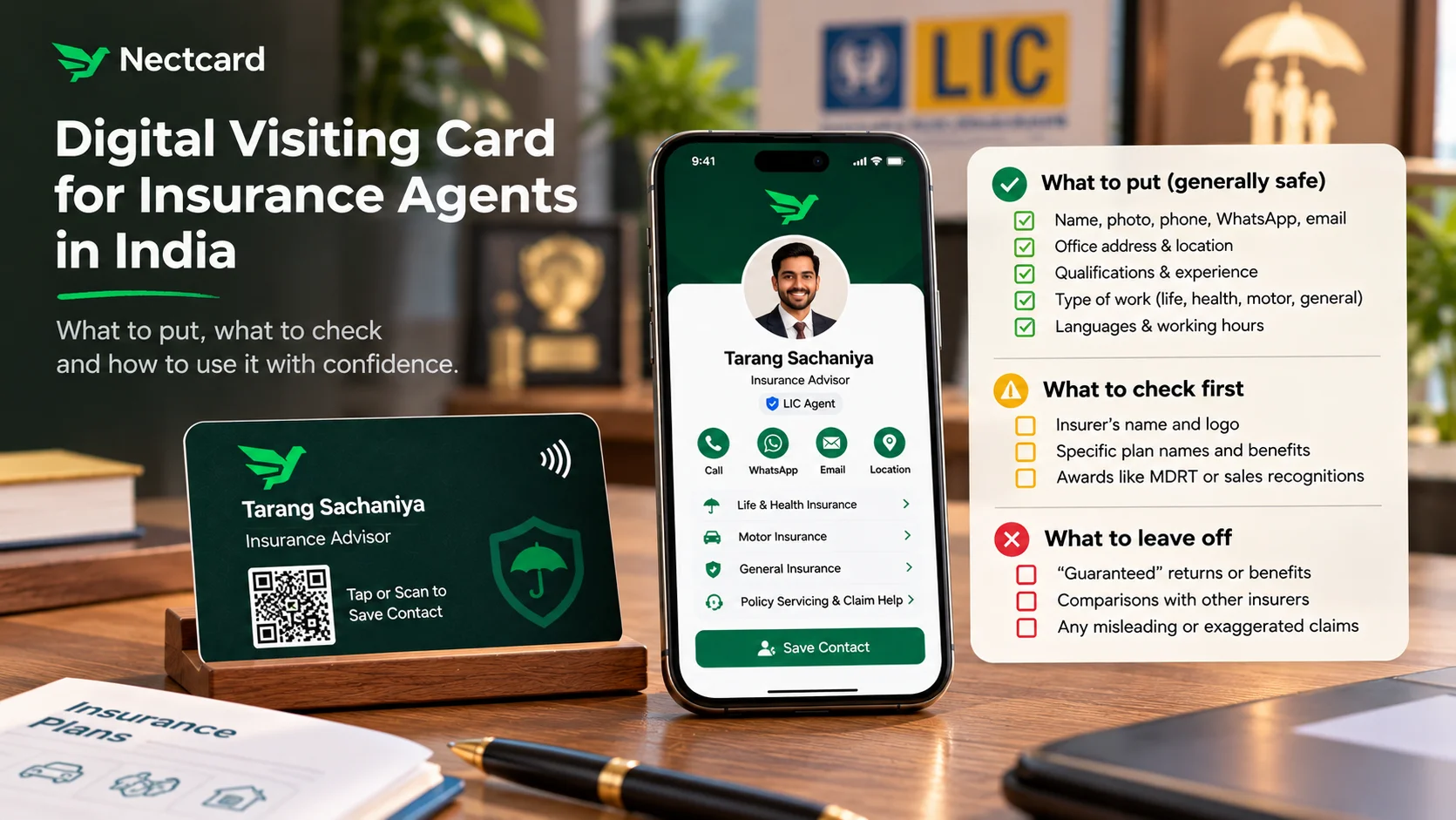
A digital visiting card works well for insurance agents because your whole business runs on people being able to reach you years later, when a renewal is due or a claim comes up. Put your name, photo, phone, WhatsApp, office address, qualifications and the kind of insurance you handle on it. Before you add your insurer's logo, product names, awards like MDRT or any performance claims, check your insurer's current advertisement rules, because IRDAI regulates how insurance is advertised, and that covers agents too.
Why agents lose touch with clients
You meet someone at a cousin's wedding, talk about a term plan over snacks, hand over a card, and six months later they can't find it. Insurance is a slow decision. People think about it, talk to family elders, and come back when something nudges them. If your number isn't saved on their phone by then, they call whoever is.
A digital card fixes the saving part. The person taps your card or scans its QR code, your profile opens in their browser, and a Save contact button adds you to their phone in one go. No app needed on their side. If you're new to how the tap works, see how NFC business cards work.
What the rules say about agents promoting themselves
This is the part most generic "digital card for insurance agents" articles skip, because they're written for other countries. In India, IRDAI regulates how insurers and their distribution channels advertise, and agents come under that.
In April 2021, Cafemutual reported that IRDAI's advertising guidelines stopped individual agents and intermediaries from promoting their business with recognitions earned on premium income or number of policies sold, MDRT being the best-known example. The same report said agents could advertise their name, logo, address, phone number, qualifications, experience and services.
In 2024 the framework changed. A Mondaq analysis from September 2024 explains that the 2021 advertisement regulations and the 2019 master circular were replaced by the IRDAI (Protection of Policyholders' Interests, Operations and Allied Matters of Insurers) Regulations 2024 and related master circulars. Under the new set-up, every insurer must have a board-approved advertisement policy, ads from distribution channels are approved inside the insurer, and the ban on misleading ads applies across every channel, social media included.
What does that mean for your card? The final word sits with your insurer's advertisement policy, not with a blog. So treat the plain contact details as safe ground, and anything that promotes a product, a ranking or an award as something to clear with your branch or development officer first.
What to put on it, what to check, what to leave off
| Item | Where it sits | Why |
|---|---|---|
| Name, photo, phone, WhatsApp, email | Put on | Basic contact details. The 2021 guidelines listed name, logo, address and phone as things agents could advertise. |
| Office address and Google Maps location | Put on | Clients and their families visit for paperwork and claims. |
| Qualifications and years of experience | Put on | Listed as allowed in the 2021 guidelines. Keep it factual. |
| Type of work: life, health, motor, general | Put on | Helps people know whether to call you for their problem. |
| Languages you speak, working hours | Put on | Small detail, saves a lot of back and forth. |
| Insurer's name and logo | Check first | Your insurer's brand rules and advertisement policy decide this. |
| Specific plan names and benefits | Check first | Product promotion goes through the insurer's approval process. |
| MDRT, club or sales-based awards | Check first | Barred for promotion under the 2021 guidelines. Confirm the current position with your insurer. |
| Returns, "guaranteed" wording, comparisons with other insurers | Leave off | IRDAI's 2020 draft listed overstated benefits and unfair comparisons as misleading. |
How to set up your card, step by step
- Write down your basic details first: name as it appears on your agency papers, phone, WhatsApp, email and office address.
- Add a clear, recent photo. People buying insurance want to see who they're trusting.
- List the kind of work you do in plain words, for example "Life and health insurance, policy servicing, claim help".
- Add your working hours and the languages you speak.
- Show the draft to your branch or development officer before adding any insurer branding, plan names or awards.
- Add a WhatsApp button so people can message you instead of calling during office hours.
- Test it: tap the card on an iPhone and an Android phone, scan the QR code, and press Save contact on both.
- Update the profile whenever your number, office or services change. The physical card stays the same.
Not sure what else belongs on a profile? Our checklist of what to put on a digital business card covers the general items.
Where the card helps in an agent's week
- Family functions and society meetings: tap or show the QR code instead of writing your number on a paper napkin.
- Home visits: before you leave, tap the card on the client's phone so you're saved under your full name, not "LIC uncle".
- Policy servicing: when a client asks how to pay a renewal or track a claim, they already have your WhatsApp.
- Seminars at offices or housing societies: put the QR code on your last slide so people save you before they leave.
- Referrals: when a happy client says "I'll send you my brother's number", ask them to forward your card link instead.
If you're with LIC, keep official work on official tools. LIC launched its One Man Office platform in February 2025, which gives agents digital tools for things like premium calculation, benefit illustrations and renewal payments. Your visiting card is how people find and save you. The insurer's own platform is where the policy work happens. Keep the two separate and you won't end up posting unapproved numbers on your profile.
Who this helps most
- Agency teams under one development officer: give every agent the same approved layout with their own contact details, so nobody adds an unapproved claim on their own. See cards for sales teams and team cards.
- Independent advisors who handle insurance alongside other financial work: keep insurance details clearly separate from other services on your profile, so clients know what you're advising on. More for freelancers and consultants.
- Agents who teach on Instagram or YouTube: link your channel, but keep the card itself to contact details and let any product content go through approval first. See creators and coaches.
Mistakes to avoid
- Copying a foreign template that lists awards, rankings and "top producer" badges.
- Writing plan returns or "guaranteed" benefits on your profile.
- Saving yourself under a nickname. Use the name on your agency papers so clients can find you when a claim comes up.
- Forgetting to update your number after switching phones. With a digital card you can change it in a minute, so do it the same day.
A short wrap-up
Your card's job is simple: make sure the client can find you when they need you. Keep it factual, check anything promotional with your insurer, and update it whenever your details change. If you want a physical tap card for this, every Nectcard also carries a QR code for phones that don't tap.
Get an NFC visiting card
Plastic, wooden or metal, with a profile you can edit any time. Ships free across India.